The Truck Packer API Now Checks Your Load Plan: 10 Rule Types, One GET Request
v0.12 adds a validation endpoint, a constraints object that replaces canRotate3d, and locked entities to the Truck Packer API. We built a pack through the API, broke it on purpose and took it from 5 problems to 0 in two calls.

The Truck Packer API can now check a load plan for you. One GET request to /api/v1/packs/:id/validation runs the same Constraint Validator that's in the app and sends back every problem in the pack, across 10 rule types, without changing anything. If you build packs from a pull sheet, a rental system or an AI agent, that's the piece that was missing: the API could always place cases, it just couldn't tell you whether the crew could actually load what it placed.
These changes shipped in v0.12 alongside AutoPack 2.0, and they're all in the API reference. To show what they do, I built a small pack through the API this morning, broke it on purpose, and fixed it with two calls.
One GET request checks a pack against 10 rule types
Source: Truck Packer API reference, Validate Pack
The validation endpoint reads the pack and writes nothing. You get back valid, a checkedCount, a problemCount and a list of problems. Each problem names the case, the rule it broke, a plain-English description, and relatedEntityIds pointing at whatever it collides with, sits on or carries. The rules it checks are OVERLAP, OUTSIDE_CONTAINER, FLOATING, UNSUPPORTED (an overhang), NO_FLIP, FLOOR_ONLY, NOTHING_ON_TOP, STACKS_ON_SAME, STACK_TOO_HIGH and OVER_PAYLOAD, which gets reported on the container itself.
Overhangs are only checked when Full Support is on, which is the default for every pack. Add ?requireFullSupport=false to skip that check for one call, or true to force it. Anything else gets a 400 back, so a typo can't quietly turn the check off.
Our test pack went from 5 problems to 0
Source: Truck Packer load plan, built and checked through the REST API on 11/23/2026
The test was a 26' box truck with a FOH console, two subs, five cable trunks and a wedge. Each case got its rules through the API: the console was No Flip and Nothing on Top, the subs were Floor Only, and the cable trunks were Stacks on Same with a Max Stack Count of 3. Then I packed it the way a rushed load-in packs it. A cable trunk went on the console, four trunks went in one stack, one sub went on top of the other, and the wedge was left hanging in the air.
The first validation call came back valid: false with 5 problems, and every one of them was a real dock problem. The console had cargo on it. Cable Trunk 1 was stacked on something that wasn't a cable trunk. Cable Trunk 5 was fourth in a stack capped at three. Sub 2 was off the floor. The wedge was floating. A pack like that looks fine in a screenshot, and that's exactly why it's dangerous.
One entities:batchUpdate call moved the trunk off the console, started a second stack, put Sub 2 on the deck next to Sub 1 and set the wedge down on top of a sub. Subs are Floor Only, but nothing says you can't put something on them. The second validation call came back valid: true with 0 problems out of 9 cases checked. Here's the pack if you want to open it.
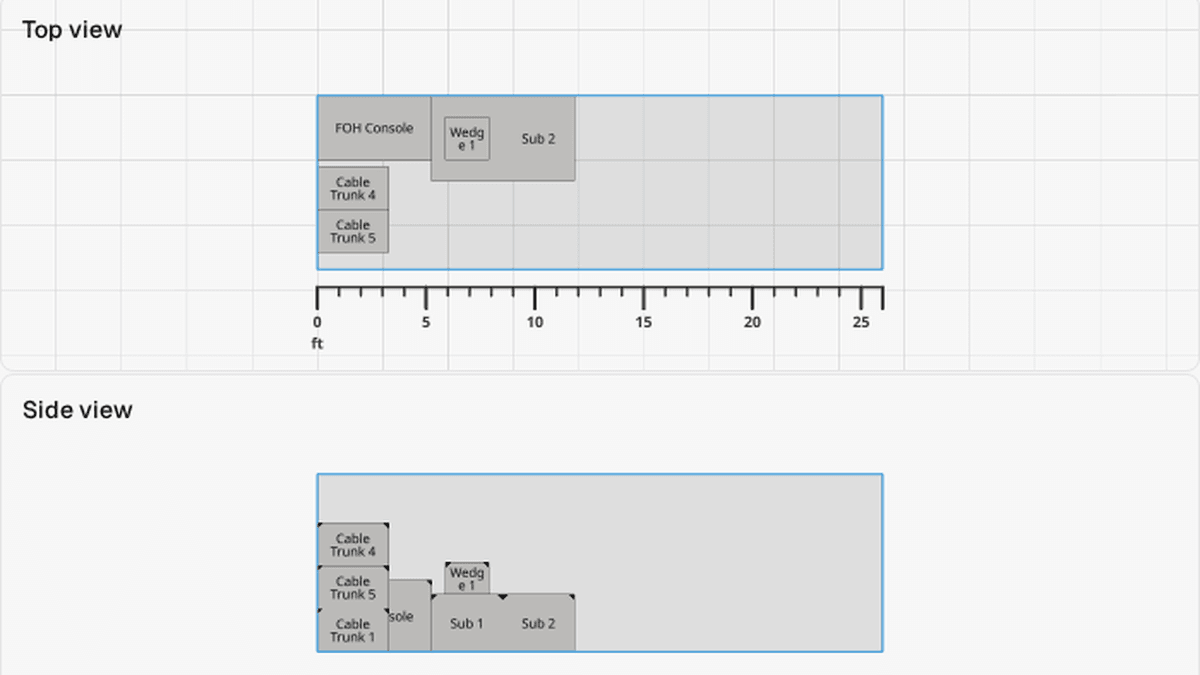
The fixed demo pack in crew view: two short trunk stacks, the console clear on top, both subs on the deck.
Placement rules ride on one constraints object
Source: Truck Packer API reference, Placement constraints
Cases and case entities now take a constraints object with five keys: noFlip, floorOnly, nothingOnTop, stacksOnSame and maxStackCount. It replaces the old canRotate3d boolean. If your integration sent canRotate3d: false, send constraints: { "noFlip": true } now. A canRotate3d in a body is ignored, so nothing breaks, but your cases also won't stay upright the way you meant them to. We'd still default everything to No Flip unless your data says a case can be tipped. Most racks and consoles can't.
Bad rules get rejected before anything is written. When I sent a case with both floorOnly and stacksOnSame on, the API answered 422 with "constraints.floorOnly and constraints.stacksOnSame cannot both be true". A maxStackCount without stacksOnSame gets a 422 too. On update, a constraints object you send replaces the stored one whole, so send the full set every time.
A locked case skips position updates
Source: Truck Packer API reference, Batch Update
entities:batchCreate and entities:batchUpdate both take locked now. A locked entity keeps its position, quaternion, size and parentId no matter what an update asks for, and AutoPack in the app packs around it. On the demo pack I locked the console, then sent a batch update that tried to move it along with the four fixes. The response listed four ids under ids and the console under skipped. Nothing errored, and the console stayed right where I put it.
That matters if a script rebuilds a pack every time the pull sheet changes. The A1 can lock the console and the drum riser where they want them, and your sync can't shove them around. If you do need to move a locked item, send locked: false with the new position in the same request. The unlock is applied first and the move after.
What to change in your integration
If you're on the API today, here's the short list. Swap canRotate3d for constraints, make sure the cases you create carry their real rules, and add a validation call as the last step of any script that builds a pack. If it comes back with problems, fix them with entities:batchUpdate and check again. The API reference has the full shapes, and the Postman collection there is updated for v0.12.
The validation step is the one I'd add first. It's the difference between an API that drops cases in a truck and one that hands the crew a pack they can actually load. If you hit something weird, send me the pack and I'll dig into it.
Building packs through the API? Log in to Truck Packer and grab a key from Settings.

