Which Placement Rule Goes on Which Case? 2,153 Library Cases Already Have One
2,153 of the 5,003 cases in the Truck Packer Manufacturer Library ship with placement rules. Here's where No Flip, Floor Only, Nothing on Top and Stacks on Same go on a real tour inventory, and what the app won't let you set.

2,153 of the 5,003 cases in the Truck Packer Manufacturer Library now come with placement rules already set, so if you build your inventory from the library, most of this work is done before you open a pack. For everything else, the four rules that shipped in v0.12 (No Flip, Floor Only, Nothing on Top and Stacks on Same) are only as good as where you put them. Here's how I'd set them on a real tour inventory, and the rules the app enforces so you can't set them wrong.
2,153 of 5,003 library cases ship with placement rules
Source: Truck Packer Manufacturer Library, counted from the live library on November 23, 2026
Of those 5,003 cases across 32 manufacturers, 1,449 are No Flip, 1,020 are Stacks on Same, 605 are Floor Only and 508 are Nothing on Top. 116 also carry a Max Stack Count. We went row by row and only marked a case as safe to tip where the maker's own info backed it up. The 137 Christie Lites rows were already hand-verified, so we left them alone. Import a library case and its rules come with it, and a rule set on a case in your library carries into every pack.
No Flip goes on anything with wheels, rack rails or a top that opens
This is the rule I'd put on almost everything that isn't a Pelican. Amp racks, consoles, sub carts, fixture cases and workboxes all ride wheels down. No Flip still lets a case turn on the floor, it just never tips onto a side. Wardrobe goes here too, even if the box would technically fit on its back. A Pelican is the opposite. It'll go on anything and in any direction, which is why the Pelican 1615 in my example pack has no rules at all.
Floor Only is for the heavy stuff, and 605 library cases have it
Source: Truck Packer Manufacturer Library
Subs, amp racks and consoles live on the deck. In the library, an L-Acoustics KS28 three-pack on its chariot (572 lb) and a Spectrum D40 amp rack are both Floor Only. The thing people miss is that Floor Only is about where the case sits, not what sits on it. In the example pack the two KS28 carts are Floor Only and still carry two soft fly rack bags on top, and the Pelican rides on the amp racks.
Nothing on Top protects what crushes, and 225 library cases are also Floor Only
Source: Truck Packer Manufacturer Library
Nothing on Top is for anything that can't take weight: line array carts, soft bags, fragile cases, and in my world the FOH console. An L-Acoustics K2 two-pack on its chariot is both Floor Only and Nothing on Top in the library, and 225 library cases carry that same pair. A soft fly rack bag gets Nothing on Top too, but not Floor Only, because it can ride on top of something else as long as nothing rides on it. If you want the space over your console kept clear, add Nothing on Top yourself. The library only says the SD12 case stays on the floor.
Max Stack Count runs 1 to 99, and most library stacks stop at 3
Source: Truck Packer docs, Placement Rules
Stacks on Same means a case only sits on the floor or on an identical case. Add a Max Stack Count and that stack stops at the number you set. In the library, 78 of the 116 cases with a count are set to 3, 21 to 2 and 15 to 6. The count is a ceiling, not a target. In the example, the Chauvet Rogue R3 wash cases are Max 3, and three high is 80.6 inches, so they go three high in a 97-inch box. The Fiasco 12U SLAM racks are also Max 3, but at 33 inches each, three high is 99 inches. The truck says two.
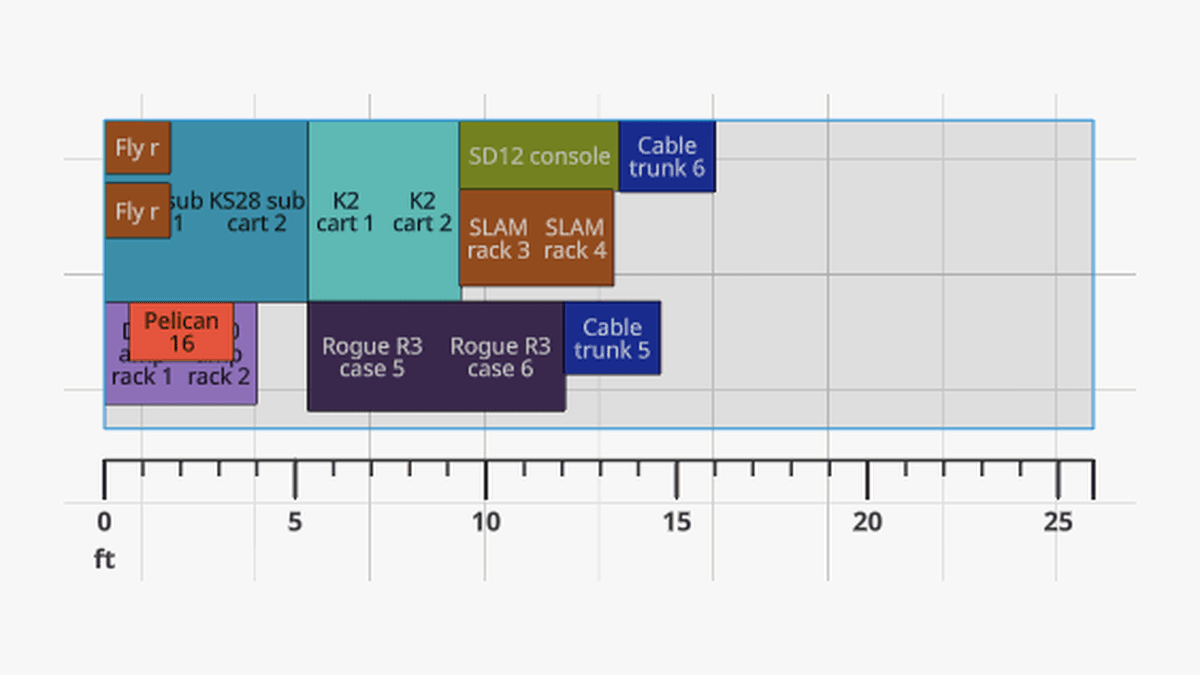
Top view of the example pack: the Floor Only carts and racks up front, Stacks on Same columns behind them.
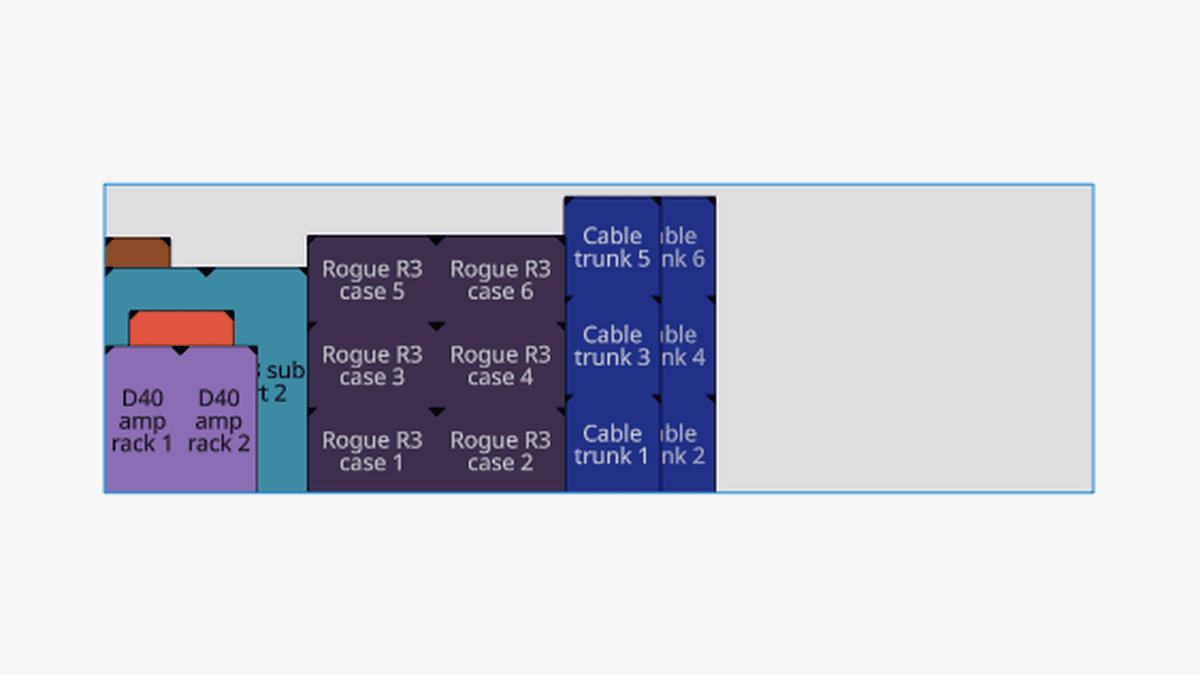
Side view: the Rogue cases and cable trunks stop at three, the SLAM racks stop at two.
Here's the example pack if you want to click through it. It's 26 library cases, 4,011 lb in a 26' box truck rated for 9,180 lb, and every case keeps the rules it came with from the library.
Floor Only and Stacks on Same can't both be on
The app won't let you turn on both, in the inspector, the case form or an import. Stacks on Same lets a case ride on its twin, and Floor Only would take that away, so you pick one. Max Stack Count needs Stacks on Same switched on as well. Put a number in the Max Stack Count column on a row without Stacks on Same and the import tells you which column it needs.
Your old spreadsheet columns still work
Import templates got five new columns in v0.12: No Flip, Floor Only, Nothing on Top, Stacks on Same and Max Stack Count. You don't have to rename the ones you already have. The importer reads No Tip, This Side Up and Upright Only as No Flip, Ground Only as Floor Only, and No Stack or Non Stackable as Nothing on Top. Stack With Like, Only Like on Top and Stack Only on Like all map to Stacks on Same, and Max Stack, Stack Limit and Max Stack Height map to Max Stack Count. Spreadsheets with the old Stackable and Flippable columns still import too.
The Constraint Validator names the rule you broke
Before I wrote this up, I copied the example pack and broke it on purpose. I laid the Pelican across both K2 carts and set a cable trunk on top of the console. Open View, then Constraint Validator, and it flagged both K2 carts with "Is marked Nothing on Top but has cargo resting on it," and the trunk with "Is marked Stacks on Same but rests on cargo that is not identical to it." It also caught the trunk hanging off the edge of the console. The clean pack comes back with zero problems.
In the 3D view, Show Placement Violations puts hazard stripes on any case that breaks one of its rules, and the same highlighting carries into crew view and exports, so the crew sees it too. It's on by default.
Where to start
If your cases came from the library, open a few and check the rules match how your shop actually loads them. If they didn't, start with No Flip and Floor Only on the big stuff and Nothing on Top on anything that crushes. That's most of the truck. Stacks on Same and a Max Stack Count on your trunks and fixture cases covers the rest.
Got cases that need rules? Log in to Truck Packer and set them once.

